What You Don’t Know About Modern
SECURITY CAMERAS
FOR YOUR BUSINESS AND WHY YOU SHOULD CARE

OLDER CAMERAS
ONLY RECORDED FOOTAGE FOR HUMANS TO REVIEW
BUT
MODERN
ONES MAKE SENSE OF WHAT IS HAPPENING
Most people assume that if their building has cameras, they are covered. That feels reasonable. If something happens, they can go back and look at it. That is still true, but it is no longer the whole story.
Many of these features are not technically new. What is new is their availability. But why should everyday organizations care?

EXAMPLE
So what does this mean in practice?
Imagine you run a daycare with a fenced-in playground. One night, a suspicious black car lingers after hours, prompting the software to flag the activity for your review. It might be nothing, but you choose to have the system notify you if the car returns.
A few days later, while the children are outside, an alert appears on your phone: the same car is back. Moments later, a second alert follows. Someone has crossed into a restricted area near the fence. Instead of reviewing the footage later, staff can be alerted while the situation is still unfolding.
That is just one difference between a system that only records events and one that interprets what it is seeing and brings urgent activity to your attention in real time.
TOP
5
most impactful
DEVELOPMENTS
1. Short Event Clips & Visual Previews
“You can stop reviewing hours of footage with nothing in it.”
Imagine you hear there might have been some activity in the back area by the dumpster last night.
In the past, a simple concern like this could turn into an annoying task. You had to decide whether the answer was worth stopping what you were doing to dig through footage manually.
Now you can see organized short event clips, with visual previews of only the times when something happened.
If checking footage feels like a chore, it usually gets put off or skipped. Short clips make it easier to verify small concerns before they turn into unavoidable big problems.

2. Secure Mobile Access

“Check your cameras without physically being there.”
Let’s say you receive an alert that a door was left open.
In the past, that could mean driving over, calling someone else, or lying awake wondering whether it was a real issue or a false alarm. Even if you had early versions of remote access they often required logging in through a desktop computer and dealing with frustrating technical software.
With secure mobile apps, authorized users can view live cameras, review recorded footage, check alerts, and verify activity from anywhere in the world with internet access.
The biggest benefit is not convenience. It is the ability for decision maker’s to have access to accurate information immediately instead of waiting, guessing, or sending someone to physically check.
3. Smart Search and Cataloging
“Catalog and categorize what your camera sees.”
For example, imagine you run a chain of self-storage units.
You get a tip from a customer about a red truck they saw acting weird. They noticed it because the driver was not using a storage unit, just sitting there for at least half an hour.
If your customer does not remember the exact day and time they saw the truck, you could be scrubbing through days of clips.
Modern systems take note of things like license plate numbers and allow users to search using keywords for things like clothing, vehicles, or behaviors. Now, within seconds, you can pull out your phone and review footage that matches the description.
This saves staff time and helps avoid uncertainty after incidents.
Search for things like:
Red Truck

Track Licence Plate Numbers
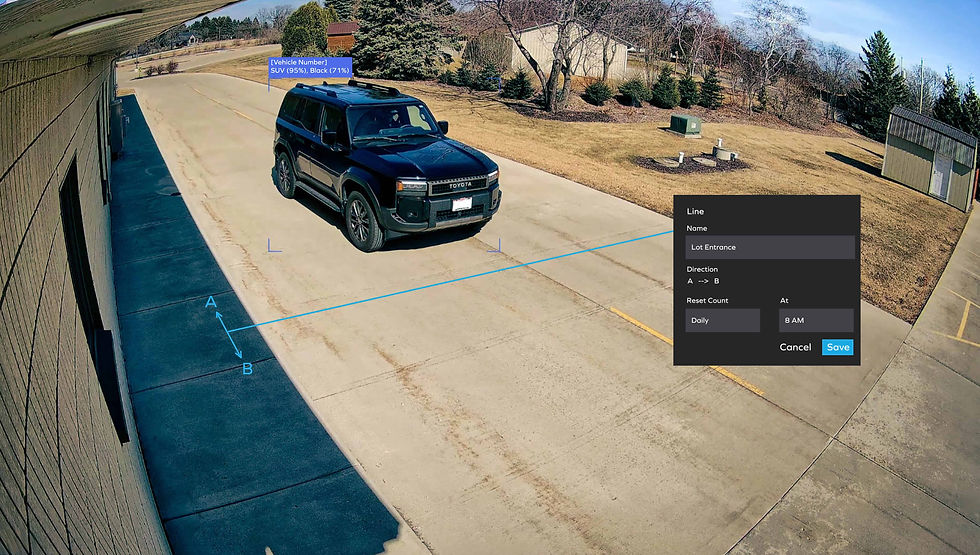
4. Custom Event Based Alerts
“Getting useless alerts can make them easier to ignore.”
When you read the daycare fence example from earlier, you could already see how important this was. Another way this can remove uncertainty is if you want to know when someone enters the parking lot after hours.
Older systems could detect motion. But tree branches swaying in the wind would often set them off. Getting useless alerts can make them easier to ignore. Taking every alert seriously can be annoying and tedious. But if you take nothing seriously, what happens if there is a real incident?
Now you can set a notification for vehicles entering a specific region of the camera’s view. Setting zones is useful when there is an area in view you do not want alerts for, like a nearby road, so you do not get pinged every time a car drives by.
There are many other types of events you can pre-program as well. Such as a person entering a designated area, an object being removed or left behind, and patterns of behaviour, such as loitering or carrying a bag.
This can help protect organizations that don’t have someone actively watching cameras all day and night.

5. Identity-Based Search and Alerts
“You probably know someone who never forgets a face. Now your security system can do the same thing.”

If you manage a facility with multiple entrances with a steady flow of visitors throughout the day, this is for you. Picture a staff member later reports that someone unfamiliar was seen in a staff-only area, but no one knows where they entered, how long they were there, or where else they went.
With a traditional system, reviewing that situation can be a slow manual process. You could find one clip of the person, but then you could be stuck jumping from camera to camera, trying to figure out where they came from.
With a system that supports identity-based recognition, staff can pull up an individual’s appearance and quickly find other moments they appeared across the system. That can help reconstruct their path through the building, identify repeated visits, or determine whether they accessed other unauthorized areas.
The same capability can also be used in more routine ways. You can associate recognized faces with saved profiles, making it possible to identify known staff, repeat visitors, vendors, or approved personnel more quickly. In some cases, this can also be used to notify staff when a specific person arrives on site, such as an executive, a frequent guest, or another important contact.
This is useful for larger or busier environments where manually piecing together someone’s movement could otherwise take significant time and effort.
So what can you do about this?
If you have not evaluated your security needs recently, you don’t have to do it alone. Reach out anytime for a free, no pressure assessment.
We can walk through your current system and answer any questions, so you can have confidence about the best path forward.
There is a contact form below, or you can reach out directly, whatever’s most convenient, drop us a note or call at:
- (414) 840-9598


You may also like